



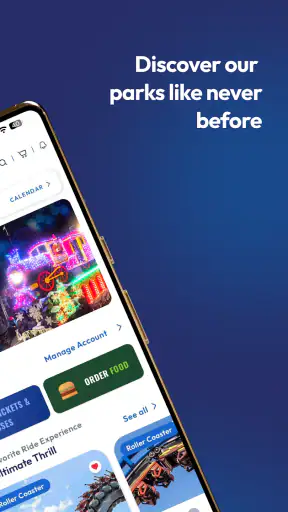
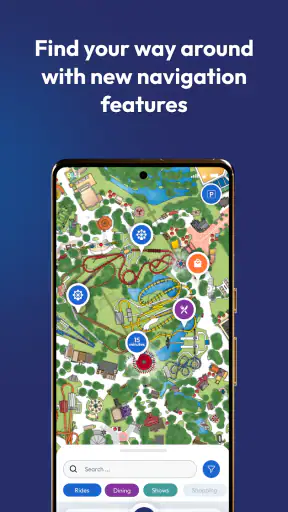
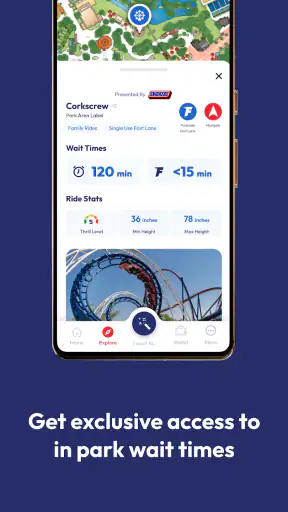
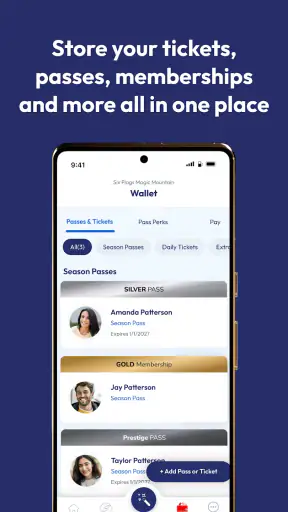
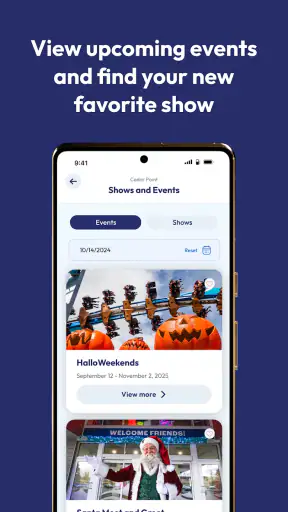
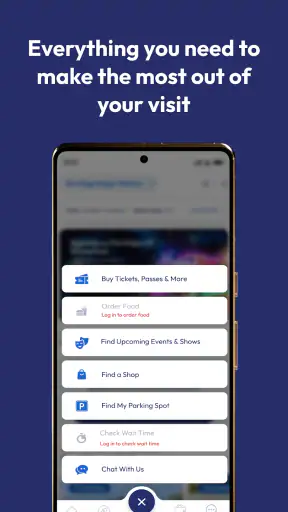
Planning a day at a Six Flags park is much easier when the information you need is gathered in one place. I used the Six Flags app as a practical companion before and during a visit, and my overall impression is that it works best when you treat it as a planning tool rather than as a complete replacement for every other travel app. It is free, aimed at everyone, and belongs to the Travel & Local category, so its purpose is clear: help visitors make better decisions while they are dealing with a large park, limited time, and changing priorities.
The app comes from Six Flags Entertainment Corp. and has been available since May 27, 2015. Its current version is 5.0.18, with support beginning at Android 8.0. That long history matters because this is not a brand-new experiment built around a single park visit. It is an established companion for the Six Flags ecosystem, although the experience still depends heavily on which park you are visiting and how well the app handles the information relevant to that location.
My honest recommendation is fairly specific: if you are already going to a Six Flags park, install it before leaving home. If you are only looking for a general trip planner, a map app, or a way to compare attractions across unrelated destinations, it is not the right tool. The value appears when the app is used alongside a simple personal plan, not when it is opened randomly every few minutes without knowing what you want from it.
How I would use it from the first plan to the last attraction
Start with a short list instead of browsing everything
My baseline workflow begins before arriving at the park. I first decide what kind of day I am having: major coasters, family attractions, shows, food, or a mixture. That small decision prevents the app from becoming an endless catalogue. Six Flags parks can contain more activities than one visit can reasonably cover, so I use the app to support priorities rather than to create an unrealistic schedule.
Once I know the main goal, I check the relevant park information and identify the attractions that would be most disappointing to miss. I then keep a second group of flexible choices for later. This is more useful than trying to arrange every minute in advance, because queues, walking time, weather, and personal energy can change the best route during the day.
The app is particularly helpful for turning a vague plan into a location-based one. Instead of thinking, “I will ride this sometime,” I can consider whether it makes sense to do it while I am already in that area. That habit reduces unnecessary backtracking. It also makes the application more useful for groups, because everyone can discuss a manageable set of choices rather than scrolling through the entire park while standing in a crowd.
A realistic family-day routine
Imagine arriving with two adults and children who do not all want the same attractions. I would use the app early to orient myself, then agree on one shared priority for the first part of the day. After that, I would leave room for a child-friendly attraction, a meal, and a break. The important point is that the app supports the conversation; it does not solve the group’s disagreements for you.
For a family, the most useful workflow is usually “one anchor, one nearby option, one fallback.” The anchor is the attraction everyone is excited about. The nearby option keeps the group moving if the first choice is inconvenient, while the fallback prevents a disappointing wait from controlling the entire day. The Six Flags app fits this method because it gives you park-specific information to consult while you make those decisions.
I would also avoid making a promise such as “we will finish everything before lunch.” That kind of plan makes any delay feel like failure. A better approach is to use the app to revise the next decision. If the group is tired, the best use of the app may be finding the next practical activity rather than chasing the most famous ride on the other side of the park.
Use it as a companion, not your only source of navigation
One limitation became clear in normal use: a park app is most useful inside its own context, while a general map application is usually better for the journey to the park, nearby hotels, fuel stops, and restaurants outside the gates. I would use a regular navigation app for the drive and keep Six Flags for park-specific planning.
This division of labor is important. Trying to make one application handle driving directions, accommodation research, traffic, and attraction planning usually creates unnecessary friction. The Six Flags app has a narrower purpose, and that narrower purpose is a strength when you respect it. It is not a weakness that it does not behave like a full travel suite; it simply means you should pair it with the tools you already use for the rest of the trip.
Check the app before the day becomes busy
I recommend opening it at home, while you still have time to think. Explore the park information, decide which parts matter to you, and become familiar with the way the app presents its content. This is one of the most practical habits for avoiding phone fatigue. When you first open a park app in a crowded entrance area, you are more likely to tap quickly, miss useful details, or waste time searching for something you could have understood earlier.
I would also make sure the phone itself is ready. A bright screen, constant use, and repeated checking can drain a battery quickly, especially during a long day. That is not a special flaw of Six Flags, but it affects how comfortably you can use it. A charged phone and a small power bank make the app much more dependable than relying on a nearly empty battery when you need to change plans.
Settings and habits worth checking
The first setting-related question is simple: does the app ask for access that you actually want to grant? I prefer to review permission prompts rather than approving everything automatically. Location-related tools can be convenient in a large park, but I still like to understand when my phone is sharing location information and whether I can use the core content without that access.
I also check notification behavior. A park companion can become irritating if it interrupts constantly, particularly for people who are already receiving messages from family members. I would keep alerts that seem useful for the visit and silence anything that feels distracting. The best setup is the one that lets you consult the app intentionally instead of making you react to the phone all day.
Another useful check is the device’s text and display settings. If the interface feels cramped, increasing system text size may make reading easier, although it can also mean that less information fits on screen. I prefer readability over squeezing everything into one view, especially when I am walking. This is a small adjustment, but it can make a noticeable difference for parents, older visitors, or anyone using the app under bright outdoor light.
Before entering the park, I would also review the app’s current content while connected to reliable Wi-Fi. I do not assume that every part of a park app will behave perfectly when reception is weak. I keep the app installed and ready, but I also remember the most important meeting points and plans in my own notes. That is not overkill; it is a sensible backup for any travel tool used in a crowded place.
Build repeatable shortcuts for a less stressful visit
Experienced users do not necessarily discover secret functions. They simply repeat a good sequence. My preferred sequence is to open the app before leaving, review the park information, choose a small priority list, check it again at the entrance, and then consult it only when the next decision requires information. This keeps the app useful without turning the day into constant screen time.
For a group, I would nominate one person as the main planner and let everyone else contribute preferences. Having four people search independently can produce four different plans and a lot of unnecessary debate. One shared workflow is faster: identify the next area, check the available choices, agree on one activity, and move on.
A second shortcut is to divide the day into blocks rather than individual attractions. For example, I might plan an early block for high-priority rides, a middle block for food and slower activities, and a final block for whatever the group still wants to repeat. The app helps me make each block concrete, but it does not force me into a rigid timetable. That balance is one of its strongest practical uses.
I also like keeping a “skip without regret” rule. If an attraction no longer fits the group’s mood or the wait feels unreasonable, I move to the next choice instead of defending the original plan. The app makes it easier to see alternatives, but the real improvement comes from accepting that a good park day is not measured by completing every possible activity.
Where the app is stronger than ordinary alternatives
Compared with a general web search, the Six Flags app is more convenient for park-specific browsing because you do not need to repeatedly search for the same destination. Compared with a paper map, it is easier to consult when your plans change. Compared with a general travel app, it is more focused on the Six Flags visit itself.
That focus is also the main trade-off. A general map application may provide a broader view of the surrounding area, while a browser may be better for reading independent visitor discussions or comparing options outside the park. I would not replace those tools with Six Flags. Instead, I would use the official app for the park’s own information and other services for independent planning.
The official connection can be reassuring when you want information presented in the context of the park you are visiting. At the same time, official presentation does not automatically make every decision easy. You still need to interpret what matters to your group, confirm that a plan is realistic, and remain flexible when the day does not follow the ideal route.
Important limits for advanced planning
The app is not a magic solution for queue management, crowd prediction, or personal scheduling. I would be cautious about building a minute-by-minute itinerary around it. Even when information is available, the practical experience of a park includes walking, finding companions, storing belongings, eating, resting, and dealing with attractions that do not fit neatly into a timetable.
Another limit is that its usefulness is tied to the park visit. If you are deciding between several destinations, you may need broader research before the app becomes relevant. It is also less attractive for someone who dislikes using a phone during leisure time. A visitor who prefers a printed plan and minimal screen interaction may find the application unnecessary, especially if the group already knows the park well.
I would be especially careful with children’s plans. The app can help identify options, but it cannot judge whether a child is tired, nervous, hungry, or ready for a break. Those human signals should take priority over any digital itinerary. The best family use is supportive: use the app to reduce uncertainty, then let the group’s condition determine what happens next.
There is also a practical difference between having the app installed and knowing how to use it efficiently. New users may spend too much time exploring every section. My advice is to learn only the parts connected to your visit. The application becomes more valuable when you approach it with a question, such as what to do next or how to orient yourself, rather than opening it simply because you feel you should be doing something.
Who should install it, and who can skip it?
I would recommend Six Flags to first-time visitors, families dividing their attention between different age groups, and anyone who wants a park-specific reference on their phone. It is also useful for people who enjoy planning a route but do not want to create a complicated spreadsheet. The free price removes the biggest barrier to trying it, and its Everyone content rating makes it suitable for a broad audience.
I would be less enthusiastic for a frequent visitor who already knows the layout, has a reliable personal routine, and prefers not to use a phone. Someone whose main need is hotel comparison, road navigation, or restaurant discovery outside the park should choose a broader travel tool. The app is also not the best fit for visitors expecting a universal guide to every amusement park or a detailed independent review platform.
Its public reception reflects that it is useful but not flawless. The app holds a 3.4 average from around 37 thousand ratings, with roughly 6.5 thousand written reviews, and it has passed 5 million installs. I read those figures as evidence of a widely used companion with noticeable room for improvement, rather than as a reason to dismiss it. The right expectation is practical assistance, not perfection.
My verdict after using a repeatable approach
After testing it through the habits I would actually recommend, I see the Six Flags app as a worthwhile preparation tool and a useful in-park reference. Its best quality is focus: it gives a Six Flags visitor a dedicated place to organize the day instead of relying entirely on scattered searches. The experience is most comfortable when I make a short plan, adjust it as needed, and avoid expecting the app to manage every part of the trip.
The app’s current version, 5.0.18, supports the basic idea of a refreshed park companion, but the version number alone does not change the central trade-off. You still need patience when information is not presented exactly as you expect, and you should keep a backup plan for weak connectivity, low battery, or a group that changes its mind. Those are ordinary realities of a busy park day, not problems that software can completely remove.
My final advice is to install it before your visit, explore it calmly, review the settings that affect notifications and location, and create a simple priority list. Use a general navigation app for the journey and Six Flags for the park itself. The most effective workflow is flexible planning, not constant checking. If you follow that approach, this free Travel & Local app can save time and reduce decision fatigue. If you want a complete travel planner or dislike digital guidance altogether, you will probably get more value from other tools or from a simple offline plan.
For me, that makes it easy to recommend to a friend who is heading to a Six Flags park for the first time. I would describe it as a helpful companion rather than an essential command center. Its strengths appear when you use it with clear priorities, sensible settings, and realistic expectations, and its limitations become much less frustrating once you stop asking it to do a general travel app’s job.


